---
title: "Barcode Printing: Your Comprehensive Back Office Guide"
description: "Effortlessly Generate and Print Product Barcodes with Easy-to-Follow Steps\nhot to print off a bar code \nbar codes\nlables"
---
[Skip to content](https://helpcentre.sparkepos.com/knowledge/how-to-print-barcodes#main-content)
English
Show submenu for translations
[More support](https://helpcentre.sparkepos.com/knowledge/kb-tickets/new?hsLang=en)
![spark 512\*512.png\]](https://helpcentre.sparkepos.com/hs-fs/hubfs/spark%20512*512.png?height=40&name=spark%20512*512.png)
- [Default HubSpot Blog](https://blog.sparkepos.com/blog)
Open main navigation
Close main navigation
- [Default HubSpot Blog](https://blog.sparkepos.com/blog)
- English
Show submenu for translations
- [More support](https://helpcentre.sparkepos.com/knowledge/kb-tickets/new)
- SPARK Powered by StreetAway®
SPARK Powered by StreetAway®
How can we help you?
- There are no suggestions because the search field is empty.
1. [SPARK • Help Centre](https://helpcentre.sparkepos.com/knowledge?hsLang=en)
2. [SPARK Cloud HQ](https://helpcentre.sparkepos.com/knowledge/spark-cloud-hq?hsLang=en)
3. [Menu Management](https://helpcentre.sparkepos.com/knowledge/spark-cloud-hq?hsLang=en#menu-management)
# Barcode Printing: Your Comprehensive Back Office Guide
## Effortlessly Generate and Print Product Barcodes with Easy-to-Follow Steps
This guide serves as your comprehensive walkthrough for the process of downloading and printing barcodes from your back office.
However, kindly note that the initial setup process will not be covered here. [To learn more about setting up barcodes, click here](https://helpcentre.sparkepos.com/knowledge/how-to-set-a-bar-code?hsLang=en)
To commence the barcode printing process, ensure you're logged into your back office account. Once logged in, navigate to the "Menu Management" section.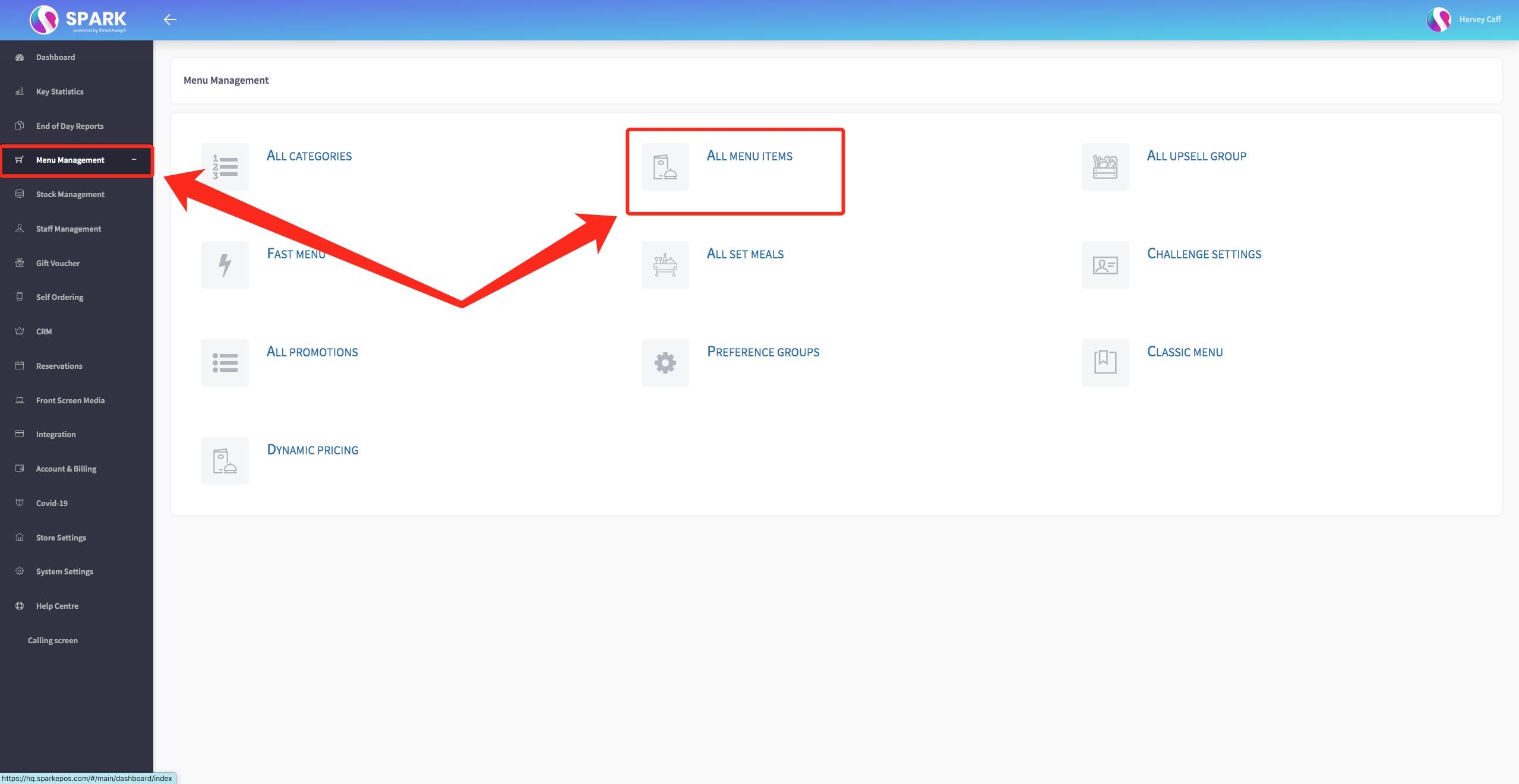
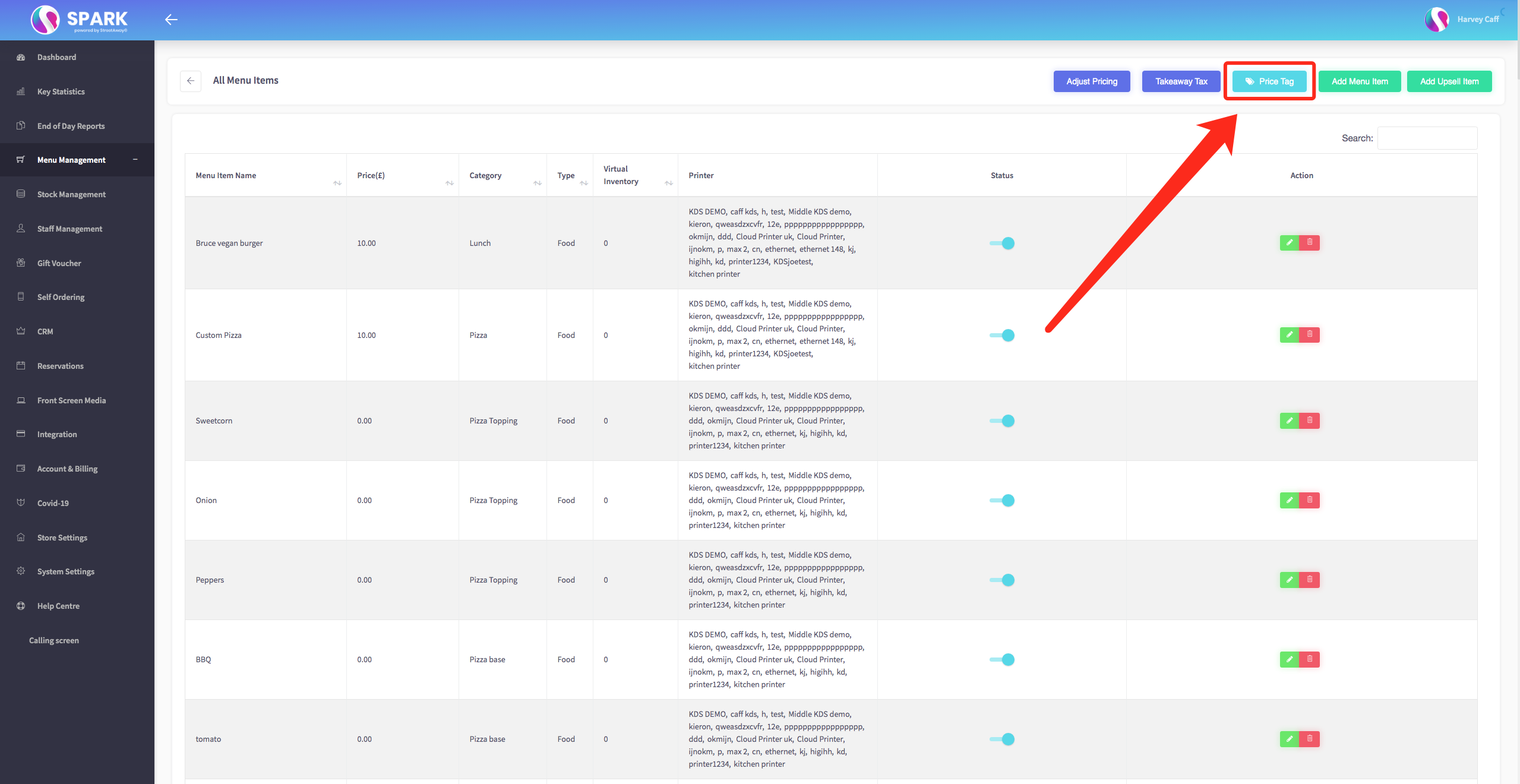
Within this section, you'll find an extensive list of all your menu items. However, your focus should be on the button labelled "Price Tags" situated at the top. Give it a click.
Upon clicking, a new page will unveil itself, prompting you to choose your preferred style for tags or barcodes. Once you've made your selection, proceed by clicking the "Next" button.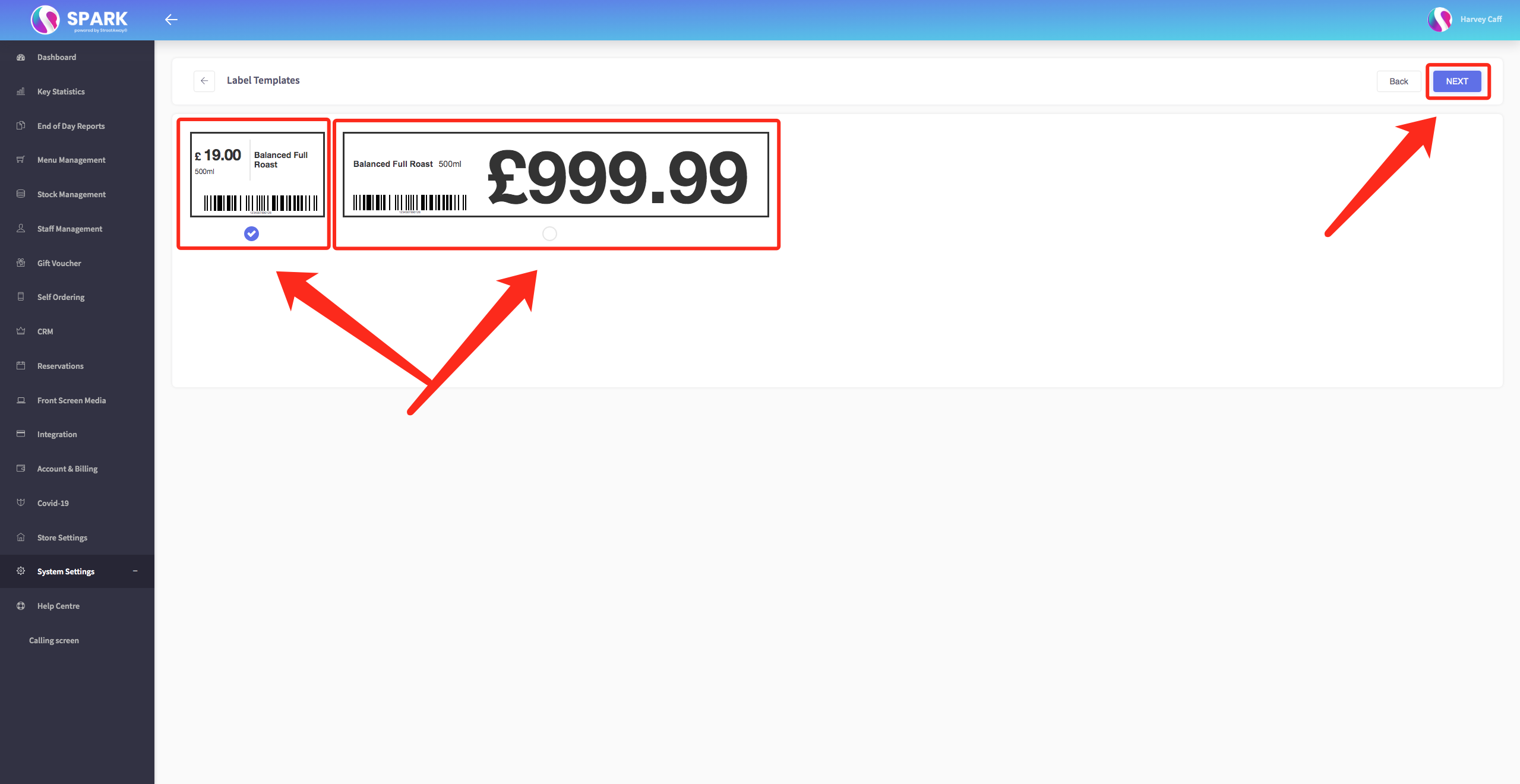
Following this, you'll be prompted to pick the specific items for which you wish to generate tags or barcodes. Alternatively, you can opt to select "All" at the top to cover all items. After making your selection, press the "Next" button once more.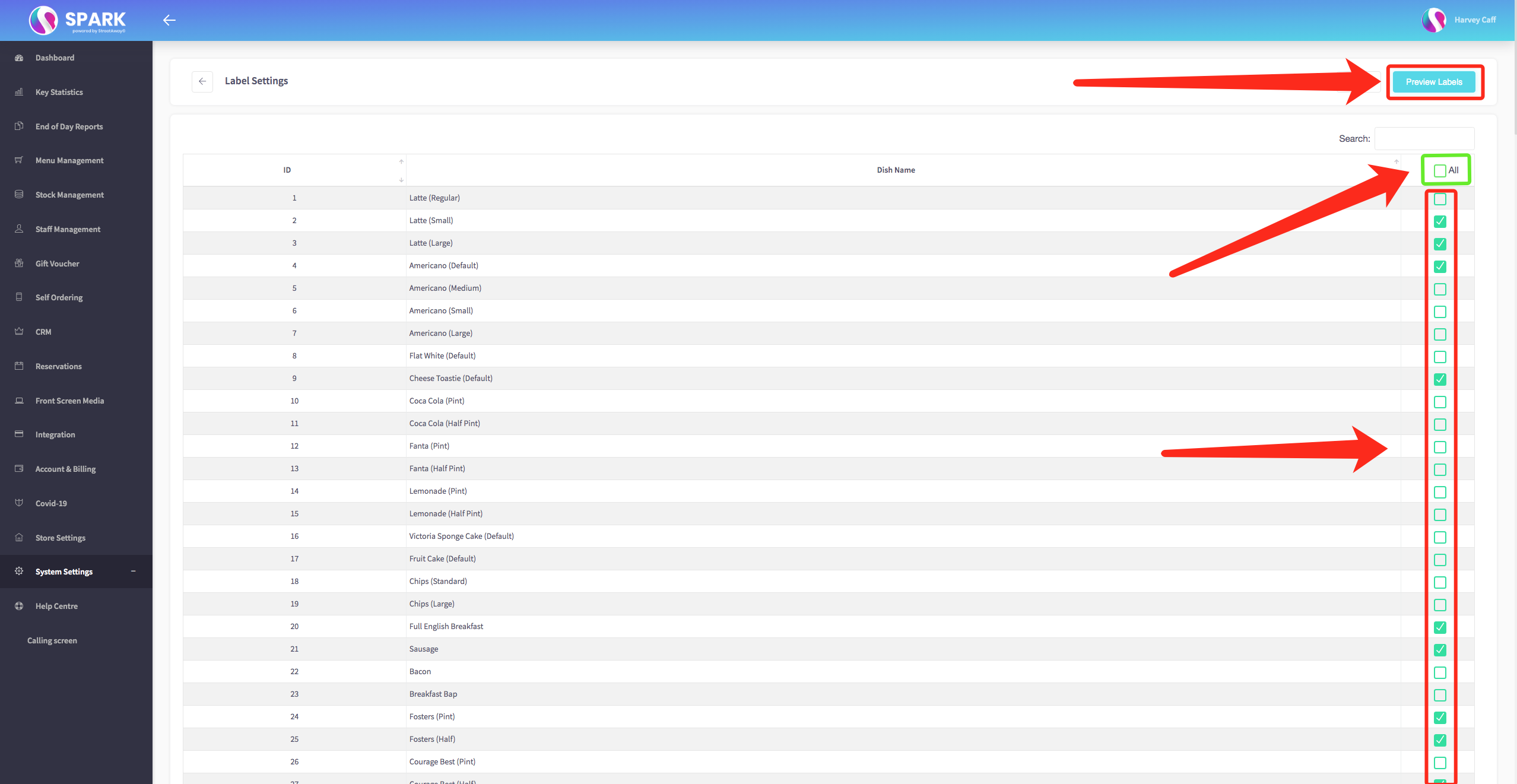
Upon hitting "Next," a fresh page will emerge, offering you the choice to either directly print the generated tags or save them in PDF format.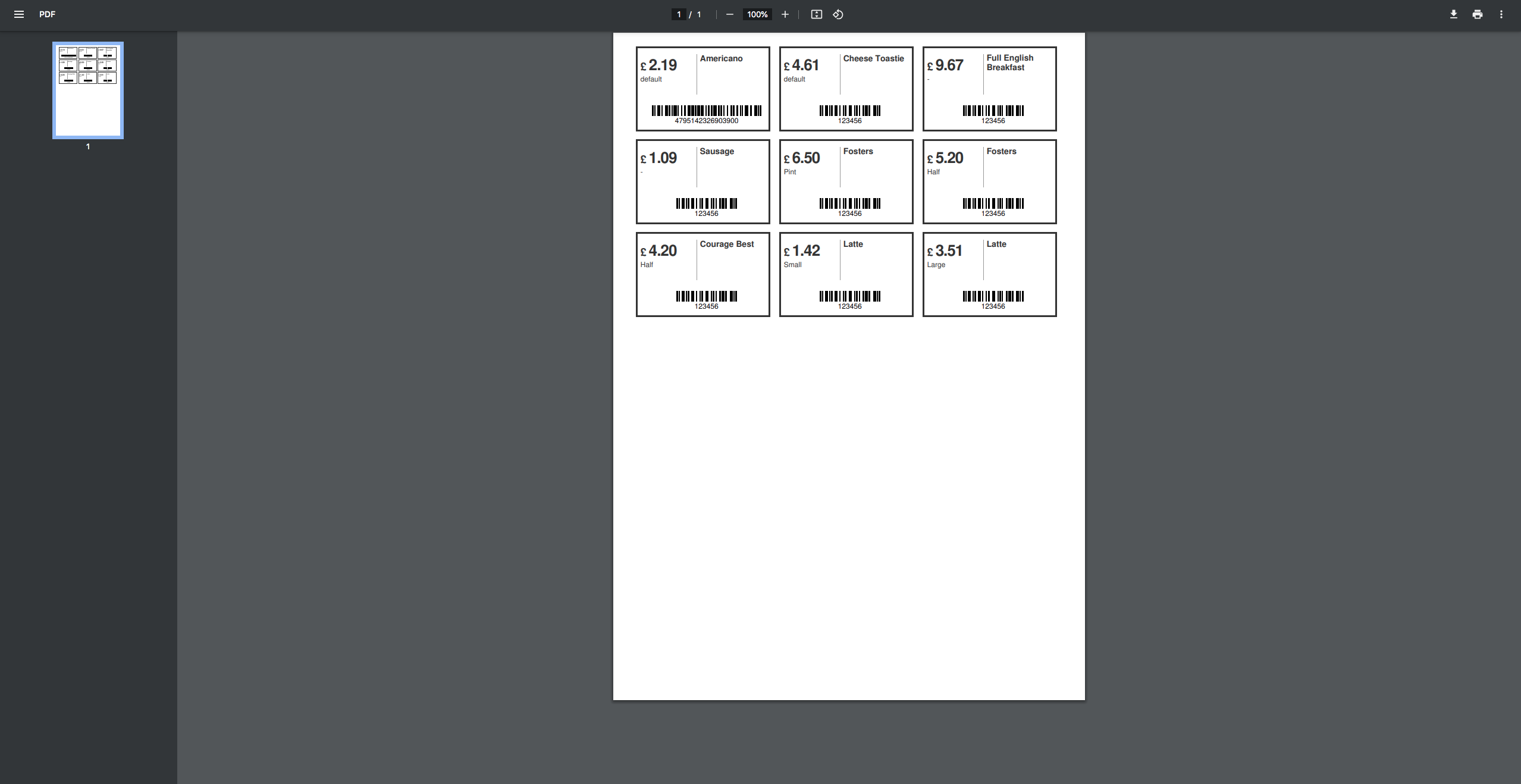
- [SPARK 2.0 - Getting Started](https://helpcentre.sparkepos.com/knowledge/spark-2-0-getting-started?hsLang=en#main-content)
- [Staff Management](https://helpcentre.sparkepos.com/knowledge/spark-2-0-getting-started?hsLang=en#staff-management)
- [Software & Installation](https://helpcentre.sparkepos.com/knowledge/spark-2-0-getting-started?hsLang=en#software-installation)
- [SPARK Cloud HQ](https://helpcentre.sparkepos.com/knowledge/spark-cloud-hq?hsLang=en#main-content)
- [Getting Started with Cloud HQ](https://helpcentre.sparkepos.com/knowledge/spark-cloud-hq?hsLang=en#getting-started-with-cloud-hq)
- [System Settings](https://helpcentre.sparkepos.com/knowledge/spark-cloud-hq?hsLang=en#system-settings)
- [Stock Management](https://helpcentre.sparkepos.com/knowledge/spark-cloud-hq?hsLang=en#stock-management)
- [Staff Management](https://helpcentre.sparkepos.com/knowledge/spark-cloud-hq?hsLang=en#staff-management)
- [Menu Management](https://helpcentre.sparkepos.com/knowledge/spark-cloud-hq?hsLang=en#menu-management)
- [Reports](https://helpcentre.sparkepos.com/knowledge/spark-cloud-hq?hsLang=en#reports)
- [CRM](https://helpcentre.sparkepos.com/knowledge/spark-cloud-hq?hsLang=en#crm)
- [Front Screen Media](https://helpcentre.sparkepos.com/knowledge/spark-cloud-hq?hsLang=en#front-screen-media)
- [End of day reports](https://helpcentre.sparkepos.com/knowledge/spark-cloud-hq?hsLang=en#end-of-day-reports)
- [Reservations](https://helpcentre.sparkepos.com/knowledge/spark-cloud-hq?hsLang=en#reservations)
- [Store Settings](https://helpcentre.sparkepos.com/knowledge/spark-cloud-hq?hsLang=en#store-settings)
- [Gift Voucher](https://helpcentre.sparkepos.com/knowledge/spark-cloud-hq?hsLang=en#gift-voucher)
- [SPARK EPOS Terminal](https://helpcentre.sparkepos.com/knowledge/spark-epos-terminal?hsLang=en#main-content)
- [Basics](https://helpcentre.sparkepos.com/knowledge/spark-epos-terminal?hsLang=en#basics)
- [Scanners](https://helpcentre.sparkepos.com/knowledge/spark-epos-terminal?hsLang=en#scanners)
- [Printing / Printers](https://helpcentre.sparkepos.com/knowledge/spark-epos-terminal?hsLang=en#printing-printers)
- [Settings](https://helpcentre.sparkepos.com/knowledge/spark-epos-terminal?hsLang=en#settings)
- [CRM](https://helpcentre.sparkepos.com/knowledge/spark-epos-terminal?hsLang=en#crm)
- [Getting Started](https://helpcentre.sparkepos.com/knowledge/spark-epos-terminal?hsLang=en#getting-started)
- [Vouchers](https://helpcentre.sparkepos.com/knowledge/spark-epos-terminal?hsLang=en#vouchers)
- [Payments](https://helpcentre.sparkepos.com/knowledge/spark-epos-terminal?hsLang=en#payments)
- [SPARK Reservations](https://helpcentre.sparkepos.com/knowledge/spark-reservations?hsLang=en#main-content)
- [Getting started with Reservation](https://helpcentre.sparkepos.com/knowledge/spark-reservations?hsLang=en#getting-started-with-reservation)
- [Terminal](https://helpcentre.sparkepos.com/knowledge/spark-reservations?hsLang=en#terminal)
- [Session Times](https://helpcentre.sparkepos.com/knowledge/spark-reservations?hsLang=en#session-times)
- [Back office](https://helpcentre.sparkepos.com/knowledge/spark-reservations?hsLang=en#back-office)
- [SPARK Handheld](https://helpcentre.sparkepos.com/knowledge/spark-handheld?hsLang=en#main-content)
- [Basics](https://helpcentre.sparkepos.com/knowledge/spark-handheld?hsLang=en#basics)
- [SPARK Pay](https://helpcentre.sparkepos.com/knowledge/spark-handheld?hsLang=en#spark-pay)
- [Device Settings](https://helpcentre.sparkepos.com/knowledge/spark-handheld?hsLang=en#device-settings)
- [Getting Started](https://helpcentre.sparkepos.com/knowledge/spark-handheld?hsLang=en#getting-started)
- [Transactions](https://helpcentre.sparkepos.com/knowledge/spark-handheld?hsLang=en#transactions)
- [Payments](https://helpcentre.sparkepos.com/knowledge/spark-handheld?hsLang=en#payments)
- [X-Read and End Of Day Reads](https://helpcentre.sparkepos.com/knowledge/spark-handheld?hsLang=en#x-read-and-end-of-day-reads)
- [Voucher](https://helpcentre.sparkepos.com/knowledge/spark-handheld?hsLang=en#voucher)
- [Table Plan](https://helpcentre.sparkepos.com/knowledge/spark-handheld?hsLang=en#table-plan)
- [Quick Service](https://helpcentre.sparkepos.com/knowledge/spark-handheld?hsLang=en#quick-service)
- [Customer LookUp](https://helpcentre.sparkepos.com/knowledge/spark-handheld?hsLang=en#customer-lookup)
- [Cash Draw](https://helpcentre.sparkepos.com/knowledge/spark-handheld?hsLang=en#cash-draw)
- [Troubleshooting Handheld connecting to Terminal](https://helpcentre.sparkepos.com/knowledge/spark-handheld?hsLang=en#troubleshooting-handheld-connecting-to-terminal)
- [SPARK Pay](https://helpcentre.sparkepos.com/knowledge/spark-pay?hsLang=en#main-content)
- [Transactions](https://helpcentre.sparkepos.com/knowledge/spark-pay?hsLang=en#transactions)
- [SPARK Pay settings](https://helpcentre.sparkepos.com/knowledge/spark-pay?hsLang=en#spark-pay-settings)
- [TidyPay Gateway](https://helpcentre.sparkepos.com/knowledge/spark-pay?hsLang=en#tidypay-gateway)
- [SPARK app (handheld)](https://helpcentre.sparkepos.com/knowledge/spark-pay?hsLang=en#spark-app-handheld)
- [Klarna](https://helpcentre.sparkepos.com/knowledge/spark-pay?hsLang=en#klarna)
- [Self Ordering](https://helpcentre.sparkepos.com/knowledge/self-ordering?hsLang=en#main-content)
- [Mobile Ordering](https://helpcentre.sparkepos.com/knowledge/self-ordering?hsLang=en#mobile-ordering)
- [Kiosk](https://helpcentre.sparkepos.com/knowledge/kiosk?hsLang=en#main-content)
- [Kiosk Express](https://helpcentre.sparkepos.com/knowledge/kiosk?hsLang=en#kiosk-express)
- [Kiosk Settings](https://helpcentre.sparkepos.com/knowledge/kiosk?hsLang=en#kiosk-settings)
- [SPARK KDS](https://helpcentre.sparkepos.com/knowledge/spark-kds?hsLang=en#main-content)
- [Getting Started](https://helpcentre.sparkepos.com/knowledge/spark-kds?hsLang=en#getting-started)
- [Features](https://helpcentre.sparkepos.com/knowledge/spark-kds?hsLang=en#features)
- [Robotics](https://helpcentre.sparkepos.com/knowledge/robotics?hsLang=en#main-content)
- [Bella Bot](https://helpcentre.sparkepos.com/knowledge/robotics?hsLang=en#bella-bot)
- [Ketty bot](https://helpcentre.sparkepos.com/knowledge/robotics?hsLang=en#ketty-bot)
- [Hola Bot](https://helpcentre.sparkepos.com/knowledge/robotics?hsLang=en#hola-bot)
- [Butler Bot W3](https://helpcentre.sparkepos.com/knowledge/robotics?hsLang=en#butler-bot-w3)
- [FAQ](https://helpcentre.sparkepos.com/knowledge/robotics?hsLang=en#faq)
- [PuduBot 2](https://helpcentre.sparkepos.com/knowledge/robotics?hsLang=en#pudubot-2)
- [Cleaning Robots](https://helpcentre.sparkepos.com/knowledge/cleaning-robots?hsLang=en#main-content)
- [Phantas](https://helpcentre.sparkepos.com/knowledge/cleaning-robots?hsLang=en#phantas)
- [SP50](https://helpcentre.sparkepos.com/knowledge/cleaning-robots?hsLang=en#sp50)
- [L50](https://helpcentre.sparkepos.com/knowledge/cleaning-robots?hsLang=en#l50)
- [C30](https://helpcentre.sparkepos.com/knowledge/cleaning-robots?hsLang=en#c30)
- [SH1](https://helpcentre.sparkepos.com/knowledge/cleaning-robots?hsLang=en#sh1)
- [FAQ](https://helpcentre.sparkepos.com/knowledge/faq?hsLang=en)
- [Create a Ticket](https://helpcentre.sparkepos.com/knowledge/create-a-ticket?hsLang=en#main-content)
- [Support Ticket](https://helpcentre.sparkepos.com/knowledge/create-a-ticket?hsLang=en#support-ticket)
- [Customer Portal](https://helpcentre.sparkepos.com/knowledge/create-a-ticket?hsLang=en#customer-portal)
- [EPOS FAQ](https://helpcentre.sparkepos.com/knowledge/epos-faq?hsLang=en)
- [Sunmi Products](https://helpcentre.sparkepos.com/knowledge/sunmi-products?hsLang=en)
- [Default HubSpot Blog](https://blog.sparkepos.com/blog)
[](http://www.sparkepos.com)
SPARK Help Centre
[mailto:email@email.com](mailto:email@email.com)
Copyright © 2026, SPARK EPoS